| Bookmark Name | Actions |
|---|
TAFJ Tools
This section describes the TAFJ tools such as tRun, tDiag, tShowCheck, tCrypt, tFindDevice and tCreateBasicReplacement.
tRun
tRun is the main entry point for running a program. This is a script in the /bin directory. It is used to execute the compiled Basic files.
 Syntax
tRun [-cf <configuration>[.properties]] <BASIC program> [<parameters>]
tDiag
tDiag is a part of the TAFJ tools. It provides information about your environment like the java version, TAFJ version, etc. The tDiag utility is used to display information about your TAFJ installation and projects setup. It is useful in pin-pointing problem areas of the setup.
Syntax
tDiag [-cf <configuration>[.properties]]
Example
Run the following command to get information about all the projects you have configured
tDiag
The resulting output looks like this:
Home           : 'C:\Temenos\Development\DEV\TAFJ\bin\..'
Conf directory      : 'C:\Temenos\Development\DEV\TAFJ\bin\../conf'
Log directory      : 'C:\Temenos\Development\DEV\TAFJ\bin\..\log'
Log directory T24    : 'C:\Temenos\Development\DEV\TAFJ\bin\..\log_T24'
Logging implementation  : LOG4J2
Version         : DEV_201705
__________________________________________________________________

java.home        : C:\Temenos\Development\3rdParty\jdk\jdk1.8.0_121\jre
java.vendor       : Oracle Corporation
java.version       : 1.8.0_121
os.arch         : amd64
os.name         : Windows 7
HostName         : LJRQKR32
IP Address        : 10.30.201.10
Runtime         : Double Byte SysSeparator
__________________________________________________________________

Default Project     : 'TEST'
__________________________________________________________________
Common validation:
Common validation completed - All fine
__________________________________________________________________
- Project : 'TEST'
    Java src dir      : C:\Temenos\Development\DEV\TAFJ\data\TEST\java
    Java classes dir    : C:\Temenos\Development\DEV\TAFJ\data\TEST\classes
    Precompile       : C:\Temenos\Development\DEV\T24\lib\Precompiled
    Update dir       : C:\Temenos\Development\DEV\TAFJ\bin\../updates
    ------------------------------------------------------------------
    Java default package  : com.temenos.t24
    ------------------------------------------------------------------
    DataBase URL      : jdbc:h2:tcp://localhost/DEV
    DataBase user      : t24
    ------------------------------------------------------------------
    Locking mode      : JDBC
    Locking name      :
    ------------------------------------------------------------------
    Current dir       : C:\Temenos\Development\DEV\TAFJ\bin\../../T24/data/T24UD
    Como dir        : C:\Temenos\Development\DEV\TAFJ\bin\../../T24/data/T24UD/&COMO&
    Hold dir        : C:\Temenos\Development\DEV\TAFJ\bin\../../T24/data/T24UD/&HOLD&
    UD encoding       : UTF-8
    ------------------------------------------------------------------
    Timezone        :
    Local          : en_US
    Debug enabled      : true
    ------------------------------------------------------------------
    JMS logger enabled   : false
    Logger API enabled   : true
    TEC disabled      : false
    ------------------------------------------------------------------
    Session monitor enabled : true
    Session monitor host  : localhost
    Session monitor port  : 8377
    __________________________________________________________________
    Project validation:
    TAFJ Java Functions Version in DB  : 18.0.0
    TAFJ Java Functions Version in File : 18.0.0
    No duplicated classes found.
tShow
tShow is part of the TAFJ tools. It provides information on the compiled Basic source. It can search for the resource on one single project and multiple ones. It can also produce a report of all the duplicate classes when run with –d argument.
Syntax
tShow [-cf <configuration>[.properties]] <SUBROUTINE.NAME>
tShow [-cf <configuration>[.properties]] -d
Example
Run the following command to view the details of CACHE.READ.
tShow CACHE.READ
This will load the java class for CACHE.READ (CACHE_READ_cl.class) for all projects in your distribution and provide information like:
- BASIC source location
- Time of compilation
- Machine where it has been compiled
- Grammar applied to this file
- Whether it is having Basic Replacement
Below is the result:
Home : 'D:\Temenos\T24Enterprise\TAFJ'

- Project : 'TAFJ201305' [ FOUND ]
       BASIC source : 'C:\Product\Version\201305\T24_BP\CACHE.READ'
      BASIC package : ''
     BASIC Import(s) : ''
        JAVA class : 'file:/ 'C:\Product\Version\201305/lib/201305.jar!/com/temenos/t24/CACHE_READ_cl.class'
       Compiled the : 12 Jul 2013 07:48:27
            on : GVAL1201010
    Compiled with TAFJ : < R13GA
        Timestamp : 1342072107042
         Grammar : 1
Include Basic Replacement : false

- Project : 'REGRESSION' [ MISSING ]
     No such routine : 'CACHE.READ' (com.temenos.t24.CACHE_READ_cl.class)
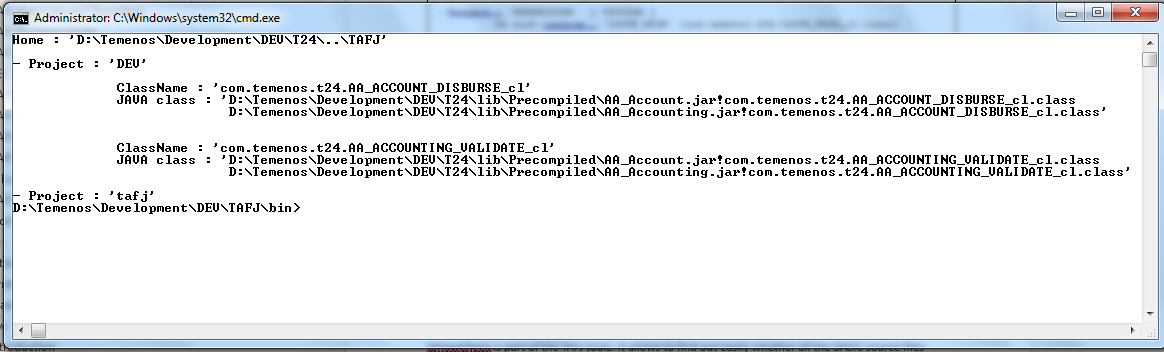
To view the duplicate classes report, use the following command:
tShow -d
Below is the result:
tShowCheck
tShowCheck is part of the TAFJ tools. It shows where all the BASIC source files have been compiled. It reports the error and warning messages to a flat file if a class is found missing in the precompiled or in the classes folder.
It takes three command line parameters:
- -s <PATH_OF_SOURCE_FOLDER>
- -p <PATH_OF_PRECOMPILED> or <PATH_OF_CLASSES_FOLDER>
- -r <PATH_OF_REPORT_FOLDER>
Syntax:
tShowCheck [-cf <configuration>[.properties]] –s [Path_of_source_folder] –p
[<path_of_precompiled> or <path_of_classes_folder>] –r [path_of_report_folder]
Example
tShowCheck -s D:\T24_BP –p D:\T24_Precompiled\R10GA.jar –r d:\Report
It generates new report file with a name tShowReport.txt.
No such routine : 'SYSTEM.SANITY.CHECK' (com.temenos.t24.SYSTEM_SANITY_CHECK_cl.class) : [ MISSING ]
 Class found but failed to get informations for 'T.TRACE' (com.temenos.t24.T_TRACE_cl.class) : [ WARNING ]
 No such routine : 'TEMPLATE' (com.temenos.t24.TEMPLATE_cl.class) : [ MISSING ]
 No such routine : 'TSDK.CALLJ.PROG.JBASE' (com.temenos.t24.TSDK_CALLJ_PROG_JBASE_cl.class) : [ MISSING ]
 No such routine : 'TV.GET.AA.CHILD.TRANSACTION' (com.temenos.t24.TV_GET_AA_CHILD_TRANSACTION_cl.class) : [ MISSING ]
 No such routine : 'TWS.AA.GET.PROPERTY.TEMPLATES' (com.temenos.t24.TWS_AA_GET_PROPERTY_TEMPLATES_cl.class) : [ MISSING ]
 No such routine : 'Tws.isTws' (com.temenos.t24.Tws_isTws_6_cl.class) : [ MISSING ]
 No such routine : 'TWS.SCHEMA' (com.temenos.t24.TWS_SCHEMA_cl.class) : [ MISSING ]
 No such routine : 'TWS.SCHEMA.APPLICATION' (com.temenos.t24.TWS_SCHEMA_APPLICATION_cl.class) : [ MISSING ]
 No such routine : 'TWS.SCHEMA.ENQUIRY' (com.temenos.t24.TWS_SCHEMA_ENQUIRY_cl.class) : [ MISSING ]
 No such routine : 'TWS.SCHEMA.GENERATE' (com.temenos.t24.TWS_SCHEMA_GENERATE_cl.class) : [ MISSING ]
 No such routine : 'TWS.SCHEMA.PROCESS' (com.temenos.t24.TWS_SCHEMA_PROCESS_cl.class) : [ MISSING ]
 No such routine : 'TWS.SCHEMA.VERSION' (com.temenos.t24.TWS_SCHEMA_VERSION_cl.class) : [ MISSING ]
 No such routine : 'UPDATE.MVS.SVS.IN.FVS' (com.temenos.t24.UPDATE_MVS_SVS_IN_FVS_cl.class) : [ MISSING ]
 No such routine : 'User.getCompanyList' (com.temenos.t24.User_getCompanyList_15_cl.class) : [ MISSING ]
 No such routine : 'User.validateCompanySwitch' (com.temenos.t24.User_validateCompanySwitch_22_cl.class) : [ MISSING ]
 No such routine : 'Util' (com.temenos.t24.Util_3_cl.class) : [ MISSING ]
 No such routine : 'V.AA.ARR.DEFAULT.CUSTOMER' (com.temenos.t24.V_AA_ARR_DEFAULT_CUSTOMER_cl.class) : [ MISSING ]
 No such routine : 'V.AM.COMPARE.VER.AUTHRTN' (com.temenos.t24.V_AM_COMPARE_VER_AUTHRTN_cl.class) : [ MISSING ]
 No such routine : 'V.MB.CHILD.ACCOUNT.RULES' (com.temenos.t24.V_MB_CHILD_ACCOUNT_RULES_cl.class) : [ MISSING ]
 No such routine : 'V.MB.COMI.PROCESS' (com.temenos.t24.V_MB_COMI_PROCESS_cl.class) : [ MISSING ]
 No such routine : 'V.MB.CUST.PROCESS' (com.temenos.t24.V_MB_CUST_PROCESS_cl.class) : [ MISSING ]
 No such routine : 'V.MB.STO.CREATE.BAL' (com.temenos.t24.V_MB_STO_CREATE_BAL_cl.class) : [ MISSING ]
 No such routine : 'V.MB.STO.CREATE.FIX' (com.temenos.t24.V_MB_STO_CREATE_FIX_cl.class) : [ MISSING ]
************************************************************************************
Total Number of Routines Requested          : 17929
Total Number of Routines Found            : 17419
Total Number of Routines Failed            : 505
Total Number of Routines with BasicReplacements    : 5
Total Time taken                   : 0 Hrs 2 Mins 54 Secs
tCrypt
tCrypt is part of the TAFJ tools. It allows encrypting the password specified in temn.tafj.jdbc.password. This will encrypt the password with DES3 algorithm. The key used to encrypt is auto generated and stored in a file called .key in the conf directory of your TAFJ installation.
Syntax
tCrypt [-cf <configuration>[.properties]]
Example
To encrypt the password for the database mentioned in configuration file, run the following command:
tCrypt -cf tafj
The resulting output looks like this:
C:\TAFJ\bin>tCrypt
Configuration: 'C:\TAFJ\bin\..\conf\tafj.properties'
Configuration file changed with encrypted password.
C:\TAFJ\bin>
Below password is displayed in tafj.properties.
Before tCrypt, password will look like this:
temn.tafj.jdbc.username       = t24
temn.tafj.jdbc.password       = secret
After tCrypt, password changes:
temn.tafj.jdbc.username       = t24
temn.tafj.jdbc.password       = ::P6PeGkfV134=
Read Only Database resources can be configured with multiple databases separated by comma. Before tCrypt, password will look like this:
temn.tafj.jdbc.ro.username     = t24user1,t24user2
temn.tafj.jdbc.ro.password     = secret1,secret2
After tCrypt, each password separated by comma is encrypted and will look like this:
temn.tafj.jdbc.ro.username     = t24user1,t24user2
temn.tafj.jdbc.ro.password     = ::23hKMsIlA2UF5h1UnPi/0Q==, ::XK7aygpDaRk=
A new password for another database can be added and encrypted using tCrypt:
temn.tafj.jdbc.ro.username     = t24user1,t24user2,t24user3
temn.tafj.jdbc.ro.password     = ::23hKMsIlA2UF5h1UnPi/0Q==, ::XK7aygpDaRk=, secret3
After tCrypt, encrypted password will look like this:
temn.tafj.jdbc.ro.username     = t24user1,t24user2,t24user3
temn.tafj.jdbc.ro.password     = ::23hKMsIlA2UF5h1UnPi/0Q==, ::XK7aygpDaRk=, ::whHSwmvjtr0=
Also existing password can be changed and encrypted using tCrypt:
temn.tafj.jdbc.ro.username     = t24user1,t24user2,t24user3
temn.tafj.jdbc.ro.password     = ::23hKMsIlA2UF5h1UnPi/0Q==, newsecret2, ::whHSwmvjtr0=
After tCrypt, encrypted password will look like this:
temn.tafj.jdbc.ro.username     = t24user1,t24user2,t24user3
temn.tafj.jdbc.ro.password     = ::23hKMsIlA2UF5h1UnPi/0Q==, ::rtn2RQvhVfK56eRbPtCqEg==, ::whHSwmvjtr0=
tFindDevice
tFindDevice is part of the TAFJ tools. It provides information about your Default Printer on your system and a list of printers which are available on your system.
Syntax
tFindDevice
Example
To Find the Default printer on your system, run the following command:
tFindDevice
The resulting output looks like this:
__________________________________________________________________

Device(s) on your system
__________________________________________________________________

Default printer : >HP Officejet Pro 8600 (Network)<
Printer 0    : >Send To OneNote 2010<
Printer 1    : >Microsoft XPS Document Writer<
Printer 2    : >HP0CE4D2 (HP Officejet Pro 8600)<
Printer 3    : >HP Officejet Pro 8600 (Network)<
Printer 4    : >Fax - HP Officejet Pro 8600 (Network)<
Printer 5    : >Fax<

__________________________________________________________________
tCreateBasicReplacement
This section shows how you can easily and safely write java code and invoke it directly from BASIC. You can write your own java class and setup the TAFJ runtime to use it instead of a BASIC subroutine. You can also invoke your java class without having a corresponding BASIC subroutine. Of course, the whole environment (like COMMONs) is available in your java class.
Writing your java class
The class you will invoke from basic (via a standard CALL(...)) must extends com.temenos.tafj.runtime.extension.BasicReplacement.
This class must also implement a static method INSTANCE and a public method stack.
You can use a tool available in the <TAFJ_HOME>/bin directory (tCreateBasicReplacement (.bat)) to avoid the copy and paste paradigm.
Syntax
tCreateBasicReplacment <full package_name_class>
Example
To create a java MailSender, run the following command:
tCreateBasicReplacement com.temenos.t24.MailSender
The above command creates the correct file structure and the class template in the ext directory:

The class MailSender contains all the necessary information for being invoked from BASIC. You will need to add your custom code in the method invoke (Object... args).
Method invoke
  public jVar invoke(Object... args) {
    //TODO : Add your code here.
    String sMessage = args[0].toString();
    ((jVar)args[1]).set("Response 3 : " + sMessage);
    return null;
  }
The argument of this method is an array of objects. These objects are jVar (a variable) and you can cast them to get the correct reference.
Despite the fact that the TAFJ jVar object is not part of any API, below are few useful methods:
- args.length - To know how many parameters are passed.
- toString() - To convert the variable in String.
- set(String) - To set a value to a variable (for example, returning a value in BASIC).
- get(<fm>, <vm>, <sm>) - To get a specific FieldMark, ValueMark, SubvalueMark.
Class Compilation
You can compile the MailSender class as any other java class. The only dependency is on the TAFJCore.jar library. For example, you can type the command below from the <TAFJ_HOME>/ext directory:
javac -cp ../lib/* com.temenos.t24.MailSender.java
This will create a MailSender.class next to the java file.
BASIC Replacement Registration
Once the class has been implemented (and compiled!) you will need to let the runtime know about it. To do that, edit the property file of your project (default is tafj.properties) and find the basic replacement section. This section looks like this by default :
#********************************************************************
#
# Basic Replacement
#
#********************************************************************
#
# These properties are shortcuting the CALL statement to invoke
# Directly a javaClass.
# The Parameters are all jVar and the count must match the
# Basic equivalent.
# The count must not be discountinuous. This means that if
# there is ...1, ...2, ...4 without ...3, ...4 will not be read and thus ignored.
#
temn.tafj.directory.ext       = <tafj.home>/ext

temn.tafj.migration.basic.1   = CHECK.ROUTINE.EXIST
temn.tafj.migration.java.1   = com.temenos.tafj.basic.CheckRoutineExist

temn.tafj.migration.basic.2   = EB.CREATE.VIEW
temn.tafj.migration.java.2   = com.temenos.tafj.basic.EbCreateView

temn.tafj.migration.basic.3   = EB.TRACE.CALL
temn.tafj.migration.java.3   = com.temenos.tafj.basic.EbTraceCall

temn.tafj.migration.basic.4	= EBS.CREATE.FILE
temn.tafj.migration.java.4	= com.temenos.tafj.basic.EbsCreateFile
As you can see, there is already few basic replacements defined by default. The only thing you need to do is to add your replacement at the end of the list like this:
#********************************************************************
#
# Basic Replacement
#
#********************************************************************
#
# These properties are shortcuting the CALL statement to invoke
# Directly a javaClass.
# The Parameters are all jVar and the count must match the
# Basic equivalent.
# The count must not be discountinuous. This means that if
# there is ...1, ...2, ...4 without ...3, ...4 will not be read and thus ignored.
#
temn.tafj.directory.ext       = <tafj.home>/ext

temn.tafj.migration.basic.1   = CHECK.ROUTINE.EXIST
temn.tafj.migration.java.1   = com.temenos.tafj.basic.CheckRoutineExist

temn.tafj.migration.basic.2   = EB.CREATE.VIEW
temn.tafj.migration.java.2   = com.temenos.tafj.basic.EbCreateView

temn.tafj.migration.basic.3   = EB.TRACE.CALL
temn.tafj.migration.java.3   = com.temenos.tafj.basic.EbTraceCall

temn.tafj.migration.basic.4	= EBS.CREATE.FILE
temn.tafj.migration.java.4	= com.temenos.tafj.basic.EbsCreateFile

temn.tafj.migration.basic.5	= SEND.MAIL
temn.tafj.migration.java.5	= com.temenos.t24.MailSender
Now, instead of compiling SEND.MAIL, TAFJ Compiler will create a wrapper to call your Basic Replacement. When TAFJ will execute a CALL SEND.MAIL(...), it will invoke the method invoke(Object... args) of your class com.temenos.t24.MailSender.
Add Bookmark
save your best linksView Bookmarks
Visit your best links BACK
BACK


Are you sure you want to log-off?